AGXBreakableJoint
AGXBreakableJoint is a joint using AGX Dynamics that breaks (becomes disabled) when certain conditions are met. The implementation uses Hinge, Prismatic, and LockJoint from AGX Dynamics.
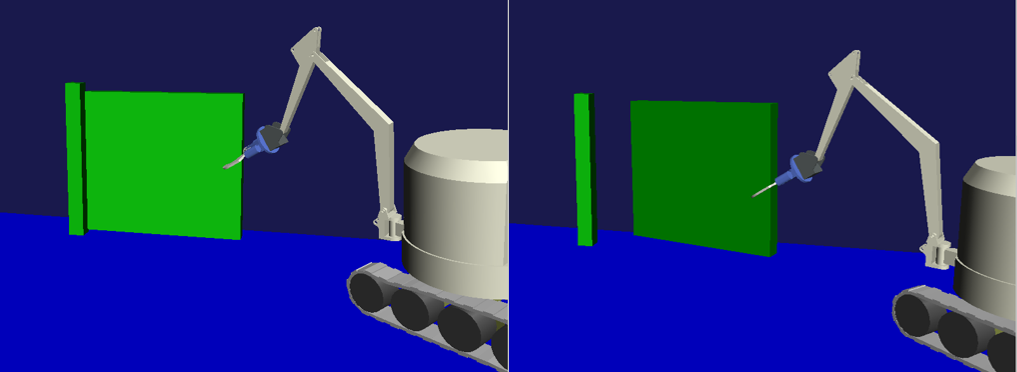
Sample
Let’s explain how to use this with a sample. The sample project is located at: By operating DoubleArm to grasp and pull the door, you can see the hinge constraint disappear and the door come off.
Project file: chorenoid/sample/AGXDynamics/agxBreakableJoint.cnoid
Body file: chorenoid/sample/AGXDynamics/agxBreakableJoint.body
Break Conditions
As explained at the beginning, AGXBreakableJoint triggers breaking when certain conditions are met. There are two types of conditions, specified by the breakType parameter.
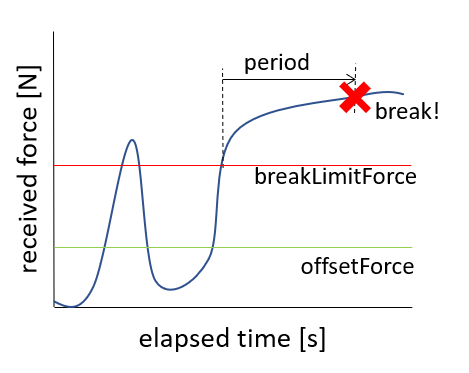
When receiving force above a certain level for a certain period of time (breakType: force)
When the received impulse exceeds a threshold (breakType: impulse)
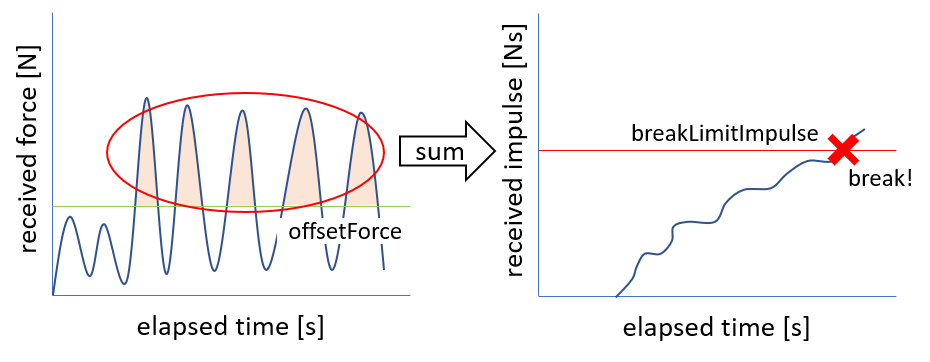
breakType should be chosen based on how force is applied. For example, in a scene where a hinged door is removed, force is appropriate. On the other hand, for objects that receive periodic impacts from a drill, it’s difficult to continuously receive force above a certain level, so impulse is appropriate.
Syntax
AGXBreakableJoint is written and used as follows:
links:
  -
    name: Door
    parent: PillarL
    jointType: free
    elements:
      -
        type: AGXBreakableJointDevice
        link1Name: PillarL
        link2Name: Door
        jointType: revolute
        jointRange: [ 0, 180 ]
        position: [ 0, 0, 0 ]
        jointAxis: [ 0, 0, 1 ]
        jointCompliance: 1e-6
        breakType: force
        period: 3.0                 # For 3 seconds or more
        breakLimitForce: 3000       # Apply force of 3000N or more
        validAxis: [0, 1, 0]        # In Y-axis direction to break
Set the links to connect with AGXBreakableJoint in linkName
Set the joint type in jointType
Set the joint position and axis in position and jointAxis
Set the break type in breakType
For breakType: force, set breakLimitForce and period
For breakType: impulse, set breakLimitImpulse
Optionally set spring stiffness and damping in jointCompliance and jointSpookDamping
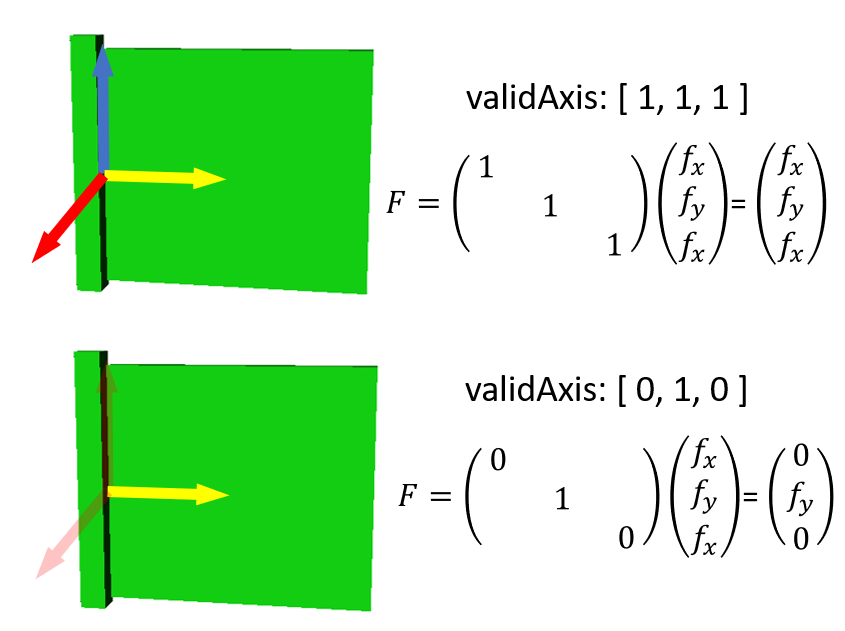
Optionally set validAxis. validAxis can specify which axes of the joint to use for breakLimit calculation. For example, in the figure below, setting validAxis to [0, 1, 0] means that forces applied in the XZ-axis directions are not considered.
Parameter Descriptions
The following describes the parameters.
Parameter |
Default Value |
Unit |
Type |
Description |
|---|---|---|---|---|
type: AGXBreakableJointDevice |
- |
- |
string |
Declaration to use AGXBreakableJoint |
link1Name |
- |
- |
string |
Link name |
link2Name |
- |
- |
string |
Link name |
jointType |
- |
- |
string |
Joint type: revolute, prismatic, fixed |
position |
[ 0, 0, 0] |
m |
Vec3 |
Joint position as seen from link1 coordinate system |
jointAxis |
[ 0, 0, 1] |
- |
Unit Vec3 |
Joint axis |
jointRange |
[ -inf, inf ] |
m or deg |
Vec2 |
Joint motion range |
jointCompliance |
1e-8 |
m/N |
double |
Joint compliance |
jointSpookDamping |
0.33 |
s |
double |
Joint spook damper |
breakType |
force |
- |
string |
Break type: force, impulse |
breakLimitForce |
double_max |
N |
double |
Force threshold for joint breaking |
period |
0 |
s |
double |
Time threshold |
breakLimitImpulse |
double_max |
Ns |
double |
Impulse threshold for joint breaking |
offsetForce |
0 |
N |
double |
Offset force |
validAxis |
[ 1, 1, 1 ] |
- |
3-element sequence |
Specifies which directions of X, Y, Z axes to enable. Setting 1 for a component enables force monitoring in that axis direction |
signedAxis |
[ 0, 0, 0 ] |
- |
3-element sequence |
Sets the sign of force threshold for X, Y, Z axes. 0 means both ±, 1 means positive only, -1 means negative direction only |